
Review: a Metalio E-Ink 4 Plus from MechDIY
You can watch this review on YouTube, which includes some clips of me using the thing.
I have a Poke3, an Xteink X4, and a Boox Picco. I once made the mistake of buying a Boox Tab Mini C. I’ve bought all of these.
So, the good folk at MechDIY contacted me to see if I’d be interested in reviewing a Metalio E-INK 4 Plus. I was. You, dear reader, can get a 10% discount using MY10. The link, the discount code, and the mention of MechDIY are the “cooperation terms” of receiving the free sample, just so you know.
There are two versions of the device: the E-INK4 and the E-INK4 Plus. The E-INK4 is smaller (3.97 inches), and does not have a frontlight. The E-INK4 Plus, the one I have, is 4.7 inches, with a frontlight.
The device is AUD $181 (which is roughly US $120, or £90). My review unit came with a silicone protective case and a cord handle, which appears to be AUD $16. Also in the box is a quite cheap-feeling USB-C to USB-C cable, and a SIM card tool.
The hardware
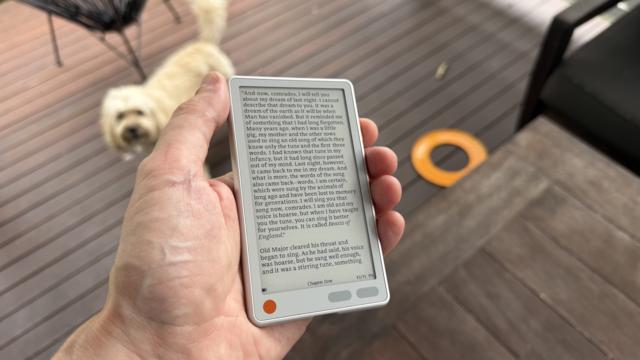
This is a nice-feeling device. It’s 70mm wide by 120mm high, with a curved metal surround, a flush back that feels like glass, and a flush front with three touch-sensitive buttons in the bottom bezel. There are also metal buttons on the right-hand side, coloured orange. The curved sides of this feel pleasant in the hand. In terms of size, it’s slightly bigger than the original iPhone (61mm by 115mm).
The metal sides of the device sit slightly higher than the screen, which offers it some protection if you place the device with its screen down.
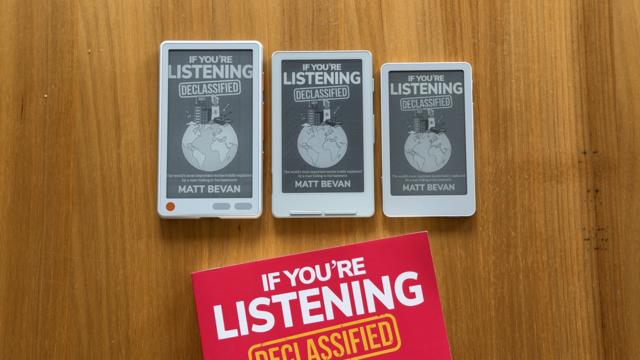
It weighs 107g. (The Xteink X4 is 77g; the Boox Picco is just 58g).
The top appears to have two microphones (presumably an array for noise cancelling). The bottom has a USB-C port, a grille for a speaker, and a SIM card slot, which is also for a 16GB SD card. The one supplied is marked “Micro SD HC”, claiming it’s a class 10 card, but doesn’t have any manufacturer mentioned. (I gather that there is a 4G version available in some countries).
The physical buttons on the side are quite clicky, and that’s seemingly amplified by the case, which feels a bit hollow and echoey. But, if you’re using this, you can swipe the screen (or use the screen buttons) to turn the pages or control the device anyway, which are entirely silent.
The screen is significantly higher-resolution than most things this size, running 1216x684 pixels. It claims to have 16-level grayscale as well. The battery is 2,000 mAh, so it should last a decent time.
There is no magnet inside this device, unlike the X4.
The chip inside is an ESP32-S31 2.4 GHz. The product’s Github goes into a bit more detail about what else it has in it.
The original software
The device was originally shipped with its own firmware called CrossLink. Here’s how confident the sellers feel about that: “A quick note about the firmware”, starts an email from the MechDIY team. “Please note that the current CrossLink firmware may not be fully optimized for the E-InK 4 Plus, so you might encounter some compatibility or software issues during testing.”
I did play around with the original firmware, once I’d worked out how to change from Chinese to English. It had lots of issues. The accompanying app was a very unfinished experience. The firmware promises something to do with AI, and there is an “AI button” on the device which I think opens a microphone and you talk to it and it responds, but I could’t get it to work and the product page is pretty clear that AI isn’t available on this device. The only book on the device was Chinese; I transferred an English book, but it didn’t even word-wrap properly.
So, let’s ignore the software that this device comes with. Because, as my email said:
“One of the advantages of Metalio is its open-source firmware ecosystem. You’re free to explore, install, and test different compatible firmware versions according to your preferences. This also gives you the flexibility to compare different systems and choose the one that best suits your reading habits.”
Some in the /r/metalioereader subreddit are using RickyOS, which looks cute.
The device is now shipping with CrossPoint, the open software that I’ve mentioned before. This is probably a good choice.
Using it with CrossPoint
The larger screen and higher resolution makes a big difference. This is a nice screen.
(Actually, almost too nice: the higher resolution screen highlights an issue with the main UI font, which is poorly anti-aliased, and appears to jump up and down between characters. I’ve reported the bug to CrossPoint, and if it’s anything like the last bug I reported there, it was fixed within a few hours.)
The frontlight is good, but doesn’t go dim enough for me - it seems similar brightness to the Picco. Delving into the CrossPoint code for the screen brightness, it seems that this is a hardware issue, not software: minimum brightness seems to go right down to 1%, which is presumably reflecting what the hardware is capable of.
CrossPoint on this device is nice, and even though it’s still in beta, it’s well-supported. The home button goes home; you can double-tap it to turn the frontlight on and off. You can even turn haptic feedback on, if you want. This has an option to only give feedback on touch, and not on page-turn; but when you swipe page-turn, it still gives haptic feedback. It’s likely to chomp through the battery, so I’ve not turned it on.
The bigger screen means that the text is a little crisper, and you can fit more on the screen before turning the page, if you want. If you’re staring at a screen, then the sharper and clearer it is, the better as far as I’m concerned. If the screen is an important thing for you, then this is a better option than the slightly smaller devices.
However, the processor speed feels significantly slower. Typing on the keyboard is, particularly, painfully slow, as is navigating menus. The good news is that you are unlikely to be doing this much; and flicking page-to-page is just as fast as the Picco is. I can’t quite discover why - the Picco runs a ESP32-S3 (which can run at 240MHz); the Metalio runs the next-generation ESP32-S31 (which can run at 320MHz). I can only assume it’s the bigger screen that slows it down, since it’s changing more than twice as many pixels. Or, the software is telling it to run slower to save battery. (My Picco is running the nightly CrossPoint; that’s not available, yet, for the Metalio).
In conclusion
The benefit of using CrossPoint on this device is that it’s a much better experience than the stock firmware. Using CrossPoint, this is a great little ebook reader.
And, it’s worth highlighting that you can use other firmware as well. That’s part of the charm of this device - you can run CrossPoint, but also other things too.
The screen is really nice, and the higher resolution makes a difference. The rounded corners make it comfortable to hold: perhaps it feels a little more childlike than the Picco’s design.
The downside of using CrossPoint is that it’s much the same experience as you’d get from cheaper devices. There are no additional features. There are speakers and microphones in this device, but they’re not being used.
So, the real question is price. Is this worth AUD $181, when the Picco is $159, and the original X4 was $105? The E-INK 4 Plus gives you a 297PPI 16-level grayscale screen, rather better than a Picco’s 235 PPI 4-level grayscale; and a 2000 mAh battery that should theoretically last twice as long (a Picco battery is just 920mAh).
Only you will know the answer to that one.
You can buy a Metalio E-INK 4 Plus with a 10% discount using MY10 (and at the time of writing, there are Black Friday deals to be had from MechDIY, too). This isn’t an affiliate link; just one I’ve been given to accompany this review.