
Review: a few weeks with a Boox Picco
Back in March, I discussed a little ebook reader, the Xteink X4. It was very good, and I wrote at the time about Dave Allie’s Crosspoint and what a difference it made to the device.
I have used it a lot. It sips power, it’s tiny and fits into my trouser pocket without any issue. It’s got me reading more books. It’s a great device.
The only downside with my X4? It didn’t have a light: so I was swapping between my Boox Poke 3 and my Xteink X4. The Poke 3 for night-time reading; the X4 for daytime reading. Which was beginning to be a bit tedious.
Step forward the US $109 Boox Picco.
The Picco comes with one important thing: a frontlit screen.
And it has the same ESP32-C3 chip running it. So, just like with the X4, I don’t have to suffer some sub-optimal software: I can ignore what the manufacturer has put on there, and instead can jump straight to Crosspoint.
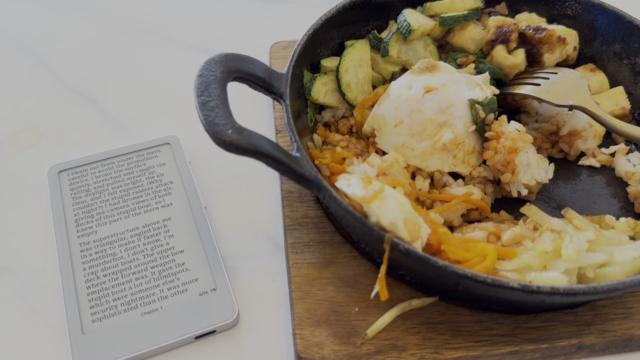
So now, I can use the same reader wherever I am - in bed, on the bus, or having a quick lunch (as above).
The hardware
The device came in a tiny little sturdy cardboard box. Because I bought from Boox directly, they threw in a little magnetic case as well. Also in the box were three screen protectors (I put one on for a bit, but didn’t do it brilliantly), and a Quick Start Guide, including a QR code to what it calls the user guide, but what is, in fact, a link to that section of the app that it needs (see below).
It has a metal border round the unit, and the buttons (power and up/down on one side, and a sliding switch on the other) are firmly attached and feel good quality. The back is plastic and textured. The front of the device is anti-reflective glass. It feels very light, but quite sturdy.
At 61mm wide and 105mm high, it’s a little smaller than the X4 (68mm wide, 113mm high). It’s got the same 480x800 resolution screen, though - just a little smaller. The Picco has touch, which the X4 lacked.
The Boox Picco has a USB-C connector for charging and data; which was one of the things that attracted me to the X4. Brilliantly, Xteink no longer sell the X4, and instead have replaced the base model with one that - stupidly - has a silly proprietary charger. D’oh!
Like the X4, it has a tiny SD card (it’s actually, I think, a TF card) already preinstalled. The card is 16GB, and that’s where your books go.
Unlike the X4, it doesn’t have a “Magsafe-like” magnet inside it. That’s put on the case, instead, if you want to use that. I only used the magnet to keep the device in a home-made case. I’ve now put the Picco in the same home-made case, so I can put it in my pocket and worry slightly less about cracking the screen.
The addition of touch is quite good. It’s much easier to control the interface, and now I have the option of changing pages with a swipe on the screen, as well as a tap of the side buttons.
The frontlight is controlled with the sliding switch on the side. You can control the colour temperature of the light, too.
It’s not noticeably smaller to read from - I do have the benefit that I’m near-sighted, so it’s fine for me. I normally have it on the smallest text.
One thing you notice is that the frontlight and the touch layer has added a bit of “depth” to the screen. It’s particularly noticeable when you’re using the frontlight itself, since there’s a bright halo round the screen because of the way it works (you’ll only see this in night mode anyway).
In short, it’s got all the benefits of the X4, but with a frontlight that works well. It’s very small, fits into my pocket, and lets me read wherever I am.
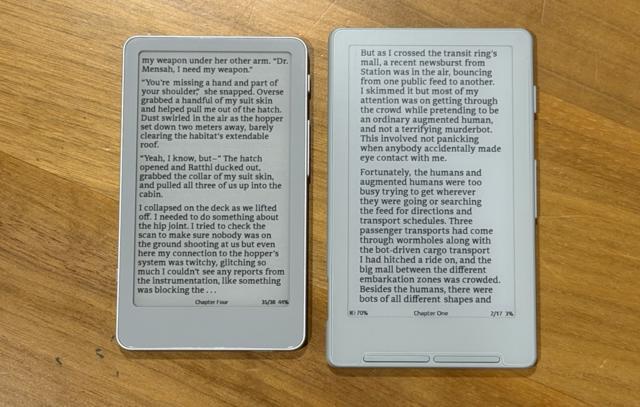
The Picco is on the left. The X4 is on the right.
The software
When it was shipped, the v1.0 of the Boox software was not great. It needed a phone app, or something, and you had to load an epub book via your phone which would convert it into an opub for the device to read, and…
Look, I’ll be honest. I can’t review the software. Because when I unpacked this device, it took about two minutes before I bunged Crosspoint on it instead. That’s a simple job: plug it into your computer, visit the Crosspoint website, and flash the new firmware directly onto the device.
The Crosspoint software
Dave Allie passed ownership of Crosspoint over to Justin Mitchell in May, and it’s had a lot of work since.
Crosspoint support for the Boox Picco is brand new and still officially in beta, but in spite of that, it is already pretty fully-featured. In the short time that I’ve had it, Crosspoint has released at least two different builds. I’m currently running a developer build of v2.0.0 for it.
I’m used to Crosspoint; but this version has a lot of refinements: partially because of the touch interface, which makes it significantly easier to use. Swipe down from the top, and you get controls for the backlight and for “night mode”, which reverses the colours. Scroll up from the bottom, and it takes you back to the home page. Tap the dead centre of the book screen for more options.
The Picco feels much faster than the X4, but I’m not sure if it’s just an effect of the touchscreen being easier to use.
I find the backlight is a little bright for pitch-black reading in bed; but the night mode makes it less harsh. I don’t know if this is something that Crosspoint itself is setting, and it’s still early days for the software; if it’s possible for one lower setting, that would be great. The backlight colours aren’t anywhere near as configurable as my Poke 3, but they’re fine.
Crosspoint appears to support Bluetooth pageturners with this device. What I found with the Poke 3 is that it required two-handed reading really: one to hold the reader, and one to turn the pages (like a real book) - you couldn’t turn the page with the same hand that holds the device. Not with this - the Picco is small enough to allow you to hold it in such a way that you can click the button as you read, so I don’t think I’ll be pairing my Bluetooth pageturner with this little thing.
Crosspoint also now supports a few more things: a “sync” service that Crosspoint runs, which also links through to my page on the Hardcover app.
And, most interestingly, Crosspoint has added a “plugins” architecture, which allows additional things to be added to Crosspoint. Included in the plugins is a way to read ACSM-protected books, which you might get from your library. I’ve tested it, and it appears to work.
Crosspoint is the thing that has made this device really, really good.
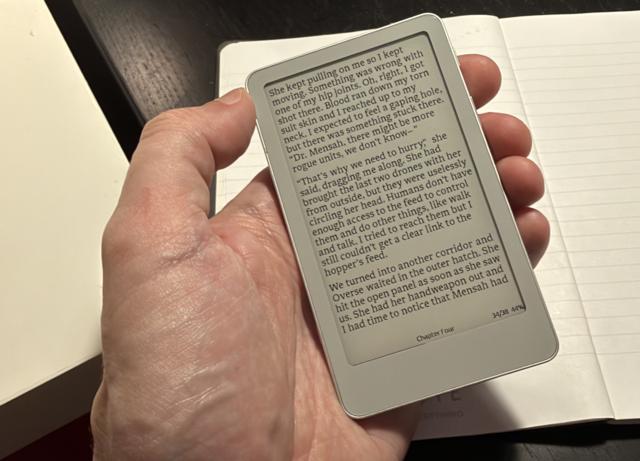
Above: it’s very small indeed. Or I have massive hands.
How to get books onto this thing
As with all these book readers, the hardest part isn’t using the hardware: it’s getting the books to put on it.
My view on this is to buy the book in some form, in a proper legal way; and then to download an epub version of the book however you like. If I’ve bought the book, the author has not incurred any losses if I download another copy of the book to format-shift it onto this device. I figure that this is the equivalent of “private copying”, which is an exception under UK copyright law, and under Australian law, though it’s a little less clear for US law. Not that I’m a lawyer, though.
But is the Boox Picco for you? Or is there another one?
The good folk at Mechdiy have contacted me to see if I’d be interested in reviewing a Metalio E-Ink 4 Plus - I’m informed that you can get a 10% discount using MY10 - and I’m looking forward to getting it in the next week or so.
This one will be slightly larger, at 4.7 inches. It has a frontlight, and a significantly higher-resolution screen, at 683x1216 pixels. It will be delivered, to people who buy it now, with Crosspoint. It has USB-C, too. I’m curious to see how it differs.