
Proposal: comments for podcast apps

For a long time now, I’ve been trying to get stuff done around comments for podcasting.
Why we need comments
The only feedback that a podcaster has is consumption stats. Some podcasters sit on their analytics pages, hitting refresh and waiting for another listener to appear.
But, statistics pages are reductive - turning your listeners into raw numbers. They don’t convey that each one of these people are human beings. And they don’t help podcasters understand what they’re doing well.
YouTube has comments. You can see the benefits of them immediately when you visit a popular video. There is the feeling of a community in the comments: people making jokes with one another, discussing individual things they saw in the video and enjoyed. Creators can talk back. It’s a (mostly) joyous experience - for the commenter and for the creator.
We need something like this. But something that works like podcasting does: everywhere.
Why socialInteract isn’t it
Podcasting 2.0 has a feature called “socialInteract”. It hasn’t gone anywhere.
I think it’s not gone anywhere for a few reasons:
- It expects podcast app developers to build a lot. To follow the specification in its entirety, your podcast app needs to become a fediverse client, to pay for the X API, to read BlueSky and to use Hive, Matrix and Nostr. Retrieving comments is a dance of multiple HTTP requests and authorisation. For a developer, it’s firmly in the “too complicated” bucket.
- It doesn’t give any control to podcast hosting companies. They aren’t allowed to produce their own discussion services; instead, the discussion can only happen on third-party websites and services.
- It doesn’t give any control to the podcast creator. Most of the third-party comment tools that are part of this specification do not allow creators to control what the comments are - to report trolls or bad behaviour, other than to rely on the platform’s own services. You also can’t only allow paying subscribers to comment (if that’s what you want).
The ideal comments system
- Something that a podcast hosting company can own and operate if they wish
- Something that a podcast membership company, like SupportingCast, Patreon or others might own and operate (and where contributions might only be possible from paying members)
- Something that could still be on the fediverse, X, BlueSky, YouTube etc if podcasters wanted
- Something that podcast creators can control if required - removing and moderating comments, marking good ones, and responding
- Something that is really easy for podcast app developers to incorporate into their apps
- Something that is flexible enough to use for all podcasts out there: ones with hundreds of thousands of listeners per episode, or ones with just tens.
How it should look
The comments - or at least a few of them - should be visible as the podcast episode is playing.
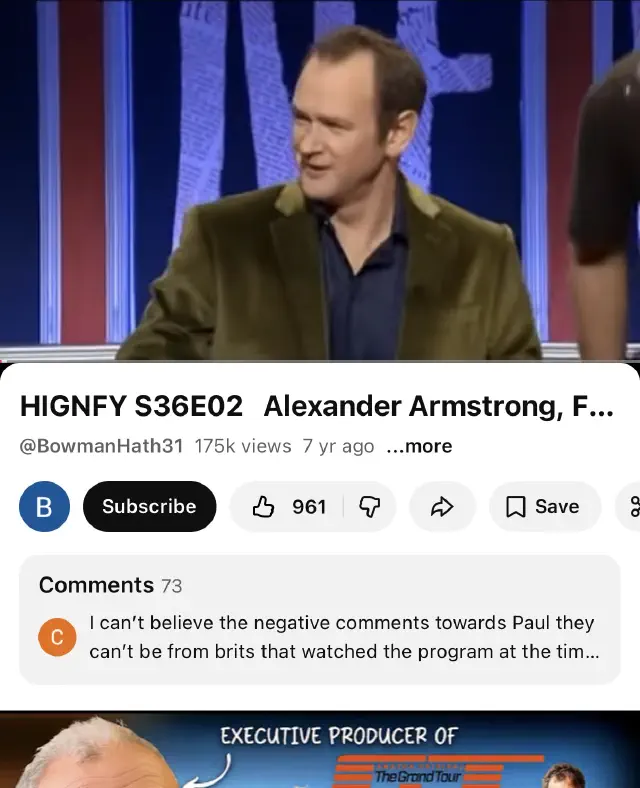
YouTube has the right idea here. It cycles through a few comments while you watch the content. It’s right there. You can expand the comments out, and hit a button to leave a new comment.
The “comments adaptor”
We can achieve much of the “ideal comments” - from whatever system we want to use - into one, standard, file format for a podcast app to grab.
A podcast hosting company could place a comment system on their website, and output these formats for the podcaster they’re with. A company like Podpage or Patreon could host comments, and output this file. A third party could take a conversation on the fediverse or on YouTube, and automatically reformat them for this file. It can be held anywhere.
It’s relatively easy to pull comments in a structured way from a Mastodon server, for example, or from BlueSky. The output of each service is different, but a simple adaptor to transform the output from any of these commenting tools into one simple service is simple.
This results in just one GET request for the podcast app developer, and all the comments for this episode are in there, ready to display. Simple, fast, and straightforward.
All we need is one file URL with the comments in it.
The comments file
There are two file formats we might use. I don’t particularly have a horse in this race, so here are two alternatives:
A proprietary JSON format with comments
{
    "title": "MyPodcast comments for EpisodeTitle",
    "link": "https://mypodcasthost.example.com/podcast24352345/episode354879324/",
    "pubDate": "Tue, 10 Jun 2023 04:00:00 UTC",
    "lastBuildDate": "Sat, 22 Jul 2023 14:04:04 UTC",
    "comments": {
        "author": "Adam Curry",
        "link": "https://adamcurry.example.com",
        "image": "https://adamcurry.example.com/avatar.jpeg",
        "description": "Go podcasting! This podcast is excellent.",
        "source": {
            "name": "Castamatic",
            "url": "https://castamatic.com"
        },
        "pubDate": "Fri, 21 Jul 2023 09:04:32 UTC"
    },
    {
        "author": "Dave Jones",
        "link": "https://davejones.example.com",
        "image": "https://davejones.example.com/avatar.jpeg",
        "description": "This podcast is so good it made my computer reboot spontaneously!",
        "pubDate": "Sat, 22 Jul 2023 14:04:04 UTC"
    }
}
This is fine. It’s extendable with new things. It all works nicely. But can we do something better for interop than a random JSON comments file?
An RSS feed for comments
This contains the same information as the JSON above; but it’s a standard RSS feed, which podcasting is built on. It means that developers can use the same parser that they’re already using for the podcast RSS feed; and also means that this is portable and understandable by many other people.
<rss>
	<channel>
		<title>MyPodcast comments for EpisodeTitle</title>
		<link>https://mypodcasthost.example.com/podcast24352345/episode354879324/</link>
		<pubDate>Tue, 10 Jun 2023 04:00:00 UTC</pubDate>
		<lastBuildDate>Sat, 22 Jul 2023 14:04:04 UTC</lastBuildDate>
		<item>
			<author>Adam Curry</author>
			<link>https://adamcurry.example.com</link>
			<image>https://adamcurry.example.com/avatar.jpeg</image>
			<description>Go podcasting! This podcast is excellent.</description>
			<source url="https://castamatic.com/">Castamatic</source>
			<pubDate>Fri, 21 Jul 2023 09:04:32 UTC</pubDate>
		</item>
		<item>
			<author>Dave Jones</author>
			<link>https://davejones.example.com</link>
			<image>https://davejones.example.com/avatar.jpeg</image>
			<description>This podcast is so good it made my computer reboot spontaneously!</description>
			<pubDate>Sat, 22 Jul 2023 14:04:04 UTC</pubDate>
		</item>
	</channel>
</rss>
In the above <item> elements, “link” goes to the user; “image” is a square avatar; “description” is the comment content; “pubDate” is when the comment was last edited. The optional “source” tag allows identification of the app being used (and yes, that’s also a RSS 2.0 tag). The “author” tag in RSS 2.0 is supposed to be an email address, of the form myemail@example.com (My Name) however where this construction is used, it’s often also possible to just place a name in there.
Using RSS for comments for individual podcast episodes is quite romantic, and has obvious benefits: that format is well-known, well-used, and means people could subscribe to comments from their RSS apps as well. Comments are already produced by WordPress in this format too.
Linking to the comments file from the podcast RSS
We need to point to this comments URL from a podcast episode, within the RSS. The comments URL never changes.
The ideal way to do this would be to use the <comments> tag that is part of the RSS specification.
So, in a podcast RSS feed,
    ...
    <item>
        <title>Episode 42: life, the universe and everything
        <author>Douglas A</author>
        <link>https://douglasa.example.com</link>
        <guid>248100</guid>
        <description>In this show we learn the answer to the great question</description>
        <pubDate>Tue, 10 Jun 2023 04:00:00 UTC</pubDate>
        <comments>https://douglasa.example.com/comments/guid/</comments>
        <podcast:>
    </item>
    ...
To enable the simplest possible implementation, the commentsURL is built from the URL in the XML, PLUS the GUID for the episode (URL encoded). The podcast app or client would simply concatenate the two together. So, as above, the full URL would be:
https://douglasa.example.com/comments/guid/248100
This allows for the URL to the comments file to be produced entirely programmatically.
If companyA is producing the podcast feed, but companyB is producing the comments feed, this means companyA needs to have no knowledge of company B’s URL structure. This overcomes an issue with chapters-json and other similar tools where the URL may not exist before the podcast has been published.
And how to post to these comments?
In both of the above examples, whether it’s JSON or RSS, the main <link> points to an HTML page that allows a user to leave a comment. That page may redirect to the X app, or to Discord, or to any manner of places.
This would open in a separate window, guide users through user registration if required, and allow them to leave a comment.
Benefits are:
For podcasters
- A podcaster can use whatever moderation they wish to use, to remove comments if they wish, or only include certain comments.
- A low-traffic podcast can elect to, for example, place all comments in all episodes if they want, so that there are always comments to read. Or, perhaps, they may wish to display comments that are about “the show” in all indivudual episodes UNLESS there are comments about that specific episode. It’s up to the podcaster what comments appear.
- It’s likely that there will either be a podcast host who wishes to implement this themselves; or a third-party provider who could do similar.
- Podcasters could even restrict comments to those who are donating to the show, or boosting, or whatever.
- Podcasters could elect not to show comment pubDates if required.
For podcast hosting companies
- You could use your own commenting system, if you already have one - no need to install and maintain unfamiliar software like Mastodon
- You can outsource this to a different provider
For listeners
- Comments will load instantly
- Leaving comments (could) be done using the app of the listener’s choice, if it’s installed, under their own username
- Comments can also be read in RSS readers
For app developers
- Comments will load instantly - it’s just one HTTP call, rather than complex handshaking of bearer headers and following threads
- There is no requirement to write any specific client interfaces into Twitter, the fediverse, etc. A user can leave a message just by following a URL which could open their social media app, or a website.
- However, an app developer can certainly write specific client interfaces to post to Twitter, the fediverse, etc, should they wish to. This removes no advanced power from a developer, but makes it much easier.
- Use of RSS could mean reusing a parser library already in the app
Issues with the above solution
The <comments> tag has no clear documentation in the RSS spec, but some accompanying comment makes it look as if it’s expected to be a link to HTML. We can stop this being an issue by suggesting either a) that GET requests are made with a “Content-Type: application/json” header or similar, to negotiate the correct format; or b) that we use a podcast:comments tag, and approach Podcasting 2.0 with a proposal for this tag to be implemented.
The commentsURL page may be very large if there are lots of comments. Perhaps we stipulate that it shows a maxmimum of 100 comments - enough for a podcast app to show - and that if there are exactly 100, the podcast app should also surface a “SEE MORE COMMENTS” link which would take the user to the page where all the comments are on.
I’d like some feedback on this
Amusingly, this blog has no comments section. The irony.
But - james@podnews.net is the right email to give me feedback for this.